
Key takeaways:
- Cleaning payroll is complex due to mobile teams, routes, PTO, and overtime.
- GPS time tracking links hours to jobs for accurate payroll and records.
- Integrated software reduces payroll errors and manual data entry.
- Supports hourly, job-based, and performance pay with automation.
- Connected payroll, scheduling, and accounting improve profitability insights.
When your cleaning business’ team is moving between homes, offices, routes, recurring accounts, and one-time jobs, payroll gets complicated fast. A platform purposely built like The Cleaning Software helps owners connect time tracking, job records, staff assignments, and payroll calculations in one system, so payday is based on accurate field data instead of manual guesswork.
For owners comparing payroll software for their cleaning business, the most important question is not simply, “Can this system run payroll?” It is, “Can this system turn real cleaning work into accurate pay?” That means capturing who worked, where they worked, how long each job took, and how pay should be calculated.

Why payroll is more complex in a cleaning business than it looks
Cleaning business payroll is more complex than many people realize because employee hours, job locations, schedules, and pay rates can change throughout the day. Unlike businesses where staff work from a single location on a predictable schedule, cleaning companies often manage teams that move between multiple properties, shifts, and service types, making accurate payroll tracking much more involved.
A cleaner may start at a residential deep clean, drive to a recurring client, join another team for a move-out clean, then finish the day with a commercial account. Another employee may cover a route, leave early for approved PTO, or clock extra time because a client added work on-site. Payroll has to reflect all of that accurately.
Common payroll challenges include:
- Variable start and finish times
- Multiple jobs in one day
- Team-based assignments
- Drive time between job sites
- Mileage reimbursement
- Hourly, job-based, or performance pay
- Tips, bonuses, and commissions
- PTO and sick leave
- Overtime for nonexempt employees
- Last-minute cancellations or schedule changes
The issue isn’t just calculating wages. The bigger challenge is proving that each paycheck is based on accurate records.
When owners rely on paper timesheets, texts, spreadsheets, or manager memory, payroll becomes a weekly investigation. Someone has to compare the schedule to the completed jobs, check who actually attended, ask about missed punches, confirm PTO, and manually enter totals into a payroll system.
That double-entry is where errors happen. A missed clock-out, wrong job assignment, or forgotten PTO entry can create underpayment, overpayment, staff frustration, and weak records. Integrated software reduces those gaps by tying time tracking directly to the work performed.
How cleaning business payroll software works
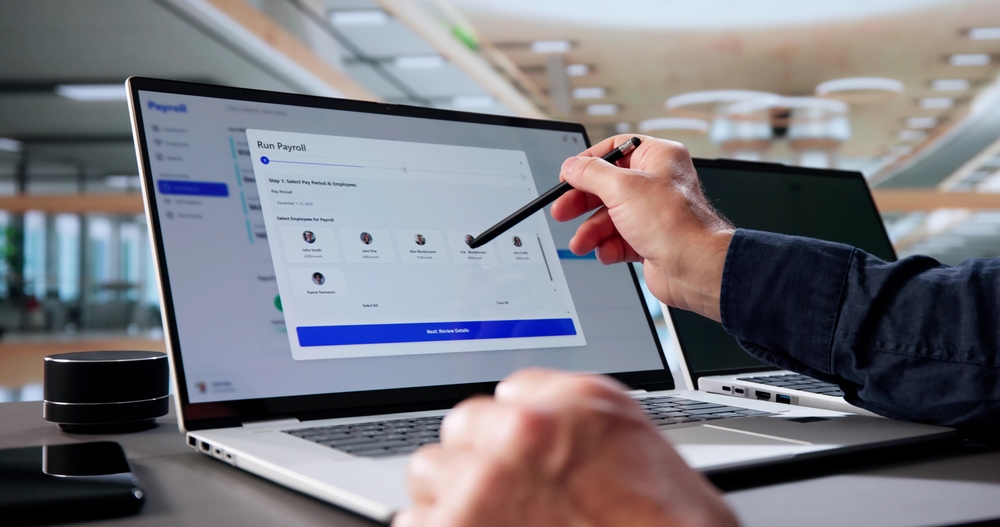
Dedicated software for cleaning business payroll turns field activity into structured payroll data. Instead of collecting hours after the fact, the system records work as it happens and organizes it for review.
A typical workflow looks like this:
- Jobs are scheduled and assigned to cleaners or crews.
- Employees clock in and out from the field.
- Time records are attached to specific jobs and employees.
- Managers review missed punches, edits, PTO, and exceptions.
- Payroll rules calculate hourly pay, job pay, mileage, tips, or bonuses.
- Approved payroll data is exported or synced for processing.
This workflow matters because cleaning companies need more than total weekly hours. Owners need to know which jobs created those hours, whether the time matched the estimate, and whether labor costs stayed within margin.
For example, a cleaner may work 32 hours in a week, but those hours may include recurring maintenance cleans, training time, drive time, and a job that ran long. Without job-level payroll data, it is hard to know whether payroll costs are healthy or whether certain services are underpriced.
The Cleaning Software connects job data, cleaner assignments, GPS-verified clock-ins, and payroll calculations in one place. That gives owners a cleaner process: review the work, approve the time, calculate the pay, and process payroll with fewer manual steps.

Core time tracking features cleaning businesses need
Accurate payroll starts with accurate time tracking. If time records are incomplete, every payroll calculation becomes less reliable.
Cleaning companies should look for time tracking features built for mobile teams, not office staff sitting at one location.
Mobile clock-in and clock-out
Employees should be able to clock in and out from a phone when they arrive at and leave a job site. This gives the office real-time visibility and reduces the need for end-of-week timesheets.
A strong time tracking setup should capture:
- Employee name
- Clock-in and clock-out time
- Job or client location
- Assigned crew
- Manager edits
- Notes for exceptions
- Payroll period
Accurate cleaning employee hour tracking helps owners keep payroll data clean without relying on paper logs, text messages, or manual end-of-week reconciliation.
GPS verification
GPS-verified time tracking helps confirm that a clock-in or clock-out happened near the assigned job location. This is useful for residential cleaning companies, commercial cleaning routes, vacation rental turnover teams, and mobile crews.
A time tracking cleaning company system should not be used to micromanage employees unnecessarily. It should support accurate payroll, accountability, route visibility, and cleaner records. Clear policies are important so staff understand what is tracked and why.
Job-level time tracking
Daily totals are not enough for cleaning payroll. Owners need job-level data to understand how long each service took and how that time affected payroll.
Job-level time tracking helps answer:
- Did the team arrive on time?
- Did the job run over estimate?
- Was the correct cleaner assigned?
- Did the route create too much drive time?
- Was payroll tied to completed work?
- Is the job still profitable?
Route and travel visibility
Travel time can quietly reduce profitability. A packed schedule may still underperform if cleaners spend too much time driving between jobs. Using route planning and GPS tracking helps owners reduce wasted travel, improve scheduling, and understand how drive time affects payroll cost.
Exception management
Missed punches, client lockouts, canceled jobs, partial shifts, and crew swaps happen in every cleaning business. Payroll software should flag these exceptions before payroll is processed. While it won’t fully remove human review, it can make it faster, clearer, and better documented.

How to calculate pay by the hour, by the job, and by performance
Cleaning companies use different pay models depending on their services, team structure, and local labor market. Good software should support the way your company actually pays people.
Hourly pay
Hourly pay is the most common and straightforward model. Employees are paid based on hours worked multiplied by their hourly rate.
Example:
- Cleaner rate: $20 per hour
- Hours worked: 34
- Gross regular pay: $680
For nonexempt employees, overtime must also be calculated correctly. Under the federal Fair Labor Standards Act, covered nonexempt employees generally must receive overtime pay at not less than one and one-half times their regular rate after 40 hours in a workweek, according to the Department of Labor’s FLSA recordkeeping guidance. State and local rules may add additional requirements.
Job-based pay
Some cleaning businesses pay by the job, by a flat amount, or by a percentage of job revenue. This model can work well when compensation is tied to completed work.
Example:
- Job price: $240
- Cleaner pay percentage: 35%
- Job pay: $84
For team jobs, software may split pay by role, percentage, or time worked.
Example:
- Job pay pool: $150
- Lead cleaner: 50% = $75
- Cleaner 2: 30% = $45
- Cleaner 3: 20% = $30
Job-based pay still requires careful tracking. If employees are nonexempt, the business generally still needs accurate time records to evaluate minimum wage, overtime, and wage-and-hour compliance.
Performance-based pay
Performance pay may include quality bonuses, attendance incentives, client review bonuses, upsell commissions, or productivity rewards.
A cleaning company may reward:
- Positive client feedback
- Completed quality checklists
- Low complaint rates
- Reliable attendance
- Add-on service sales
- Team productivity
- Customer tips
The important thing is consistency. Performance pay should be based on clear rules, not subjective memory. The Cleaning Software helps by connecting job results, cleaner assignments, time records, and payroll equations, so bonus and performance pay calculations are easier to review.
Payroll automations that reduce weekly admin time
Manual payroll takes time because the information is scattered. Owners and office managers often have to collect timesheets, check texts, confirm schedule changes, review PTO, calculate mileage, and enter everything into payroll. Automation reduces this workload by turning recurring payroll steps into a repeatable process.
Useful payroll automations include:
- Automatic pay calculations from approved time
- Job-based pay formulas
- PTO and sick leave tracking
- Mileage and drive-time reporting
- Tip and bonus tracking
- Missing punch alerts
- Payroll reports by employee, team, or job
- Export-ready payroll summaries
- New-hire payroll setup workflows
Automation also improves employee trust. When staff ask why their paycheck looks a certain way, the office can point to time records, job records, PTO entries, and approved payroll rules.
New employees are another common payroll risk point. If pay rates, availability, tax forms, roles, and payment details are not set up correctly from the beginning, errors can happen on the first check. A structured process for onboarding and paying cleaning employees helps prevent those early mistakes.
The Cleaning Software reduces payroll admin by keeping staff records, schedules, time tracking, job details, mileage, and payroll calculations in one connected workflow.

How to handle PTO, sick leave, and variable hours in cleaning payroll
PTO and sick leave are harder to manage in cleaning companies because schedules change often. Employees may work different days each week, cover another cleaner’s shift, or take partial-day leave.
Payroll software should make time off visible before the schedule is finalized and before payroll is approved.
PTO tracking
A good PTO workflow should track:
- PTO accrued
- PTO used
- PTO balance
- Approved requests
- Pending requests
- Partial-day PTO
- PTO pay rate
- Manager approval notes
For variable-hour employees, PTO accrual may depend on hours worked. That means accurate time tracking directly affects accurate PTO balances.
Sick leave
Paid sick leave requirements vary by state, city, employer size, and employee location. Cleaning businesses should configure sick leave policies based on where their employees work.
Software helps by documenting requests, approvals, balances, and paid sick hours. This creates a clearer record and reduces the chance that sick time is missed during payroll.
PTO isn’t only a payroll issue. It is also a scheduling issue. If an unavailable cleaner is assigned to a job, the company may face missed service, rushed reassignment, and payroll confusion.
Availability and scheduling conflicts
A connected system for staff PTO and availability management helps prevent scheduling conflicts before they become payroll problems.
Variable hours
Many cleaning employees don’t work the same number of hours every week. Payroll software should handle fluctuating schedules without forcing the office to rebuild totals manually.
That includes:
- Weekly hour totals
- Job-level time
- PTO hours
- Sick leave
- Unpaid time off
- Manager-approved edits
- Payroll cutoff dates
- Overtime alerts
When PTO, sick leave, availability, and time tracking are connected, payroll becomes a review process instead of a guessing game.
How payroll software reduces compliance risk for cleaning employers
Payroll compliance is one of the strongest reasons to move away from spreadsheets. Cleaning employers need accurate wage, hour, payroll tax, and employment records. Software does not replace legal, tax, or payroll advice. However, it can reduce risk by improving documentation and consistency.
Payroll software can help document:
- Clock-in and clock-out times
- Job-level hours
- Pay rates
- Overtime calculations
- PTO and sick leave
- Manager edits
- Tips, bonuses, and reimbursements
- Payroll approvals
- Exported payroll reports
Tax recordkeeping matters too. In its employment tax recordkeeping guidance for small businesses, the IRS says employers should keep employment tax records for at least four years after filing the fourth quarter for the year, and those records should be available for IRS review. A system for cleaning business payroll that keeps approved time records, pay calculations, and payroll reports organized can make accountant requests, tax reviews, and year-end reconciliation much easier.
Cleaning companies should also be careful with worker classification. Payroll software should not be used to treat employees as contractors if the working relationship does not support that classification. If your company controls schedules, routes, uniforms, client assignments, training, and quality standards, classification should be reviewed with a qualified advisor.
The Cleaning Software supports compliance-focused operations by keeping job assignments, time records, payroll calculations, and manager approvals connected.
How to connect payroll data to your accounting software
Payroll does not end when employees are paid. The numbers also need to flow into accounting so owners can understand labor cost, job profitability, taxes, and cash flow.
At a minimum, your payroll data should connect to:
- Gross wages
- Employer payroll taxes
- Employee deductions
- Reimbursements
- Tips
- Bonuses
- PTO liabilities
- Payroll liabilities
- Labor cost by job
- Labor cost by team
- Payroll payments
Total payroll isn’t the most valuable accounting connection, but payroll by category is. Owners should be able to see how much labor went into recurring residential cleans, deep cleans, move-out cleans, commercial accounts, post-construction cleaning, training time, and drive time.
This helps answer questions like:
- Which job types are most profitable?
- Are estimates accurate?
- Are certain teams regularly over time?
- Is drive time hurting the margin?
- Are labor costs rising faster than revenue?
- Should pricing be adjusted?
Payroll reports should export cleanly or sync into your accounting workflow. Some companies send approved payroll data to a payroll provider and record summary entries in accounting. Others need detailed job-costing reports.
The right setup depends on your accounting process, but the goal is the same: payroll should not be trapped in a disconnected system.
ROI of integrated payroll: time saved and errors prevented
The ROI of integrated payroll comes from two places: reduced admin time and fewer payroll errors.
Manual payroll may feel “free” when the owner handles it personally, but that time has a cost.
Example:
- Office manager spends 4 hours per week preparing payroll
- Admin labor cost: $35 per hour
- Weekly payroll admin cost: $140
- Annual cost: $7,280
If integrated software cuts that work in half, the business saves about $3,640 per year in admin time.
For an owner, the opportunity cost may be higher.
Example:
- Owner spends 3 hours per week on payroll
- Owner time value: $75 per hour
- Weekly cost: $225
- Annual cost: $11,700
That time could be spent selling recurring accounts, improving retention, hiring, training, or reviewing margins.
The second ROI category is error prevention. Payroll mistakes take time to fix and can damage trust with staff.
Common errors include:
- Missed clock-outs
- Wrong job assignments
- Forgotten PTO
- Incorrect mileage
- Missed bonuses
- Wrong pay rates
- Scheduled time used instead of actual time
- Overtime not flagged before payroll
Integrated software reduces the number of places data has to be re-entered. When scheduling, time tracking, job completion, and payroll calculations live together, payroll becomes more accurate and easier to approve.
How to choose payroll and time tracking software for a cleaning business
The best payroll and time tracking system for a cleaning company should match how field teams actually work. Generic payroll tools may process checks, but they may not capture the job-level detail that cleaning owners need.
Before choosing software, ask these questions:
1. Does it track time by job?
You should be able to see which employee worked on which job and for how long. This supports payroll, estimating, scheduling, and profitability analysis.
2. Does it support GPS-verified clock-ins?
GPS verification helps confirm that time records match assigned job locations. This is especially useful for mobile teams that start the day in the field.
3. Does it support your pay structure?
Look for software that can handle hourly pay, job-based pay, mileage, tips, bonuses, PTO, sick leave, and payroll-ready reporting.
4. Does it reduce double-entry?
If your team still has to copy hours from one system into another spreadsheet, the process is still too manual. True payroll integration should reduce re-entry and reconciliation.
5. Does it include manager review?
Payroll should still have an approval step. Managers need to review missing punches, edits, PTO, and unusual time records before payroll is processed.
6. Does it connect to accounting?
Payroll affects job costing, taxes, cash flow, and profitability. Reports should move cleanly into your accounting process.
7. Is it built for cleaning businesses?
Cleaning businesses deal with recurring jobs, changing routes, client notes, teams, PTO, quality checks, and mobile clock-ins. A cleaning-specific system gives you workflows that reflect those realities.
The Cleaning Software is built for cleaning companies that need scheduling, crew management, time tracking, payroll calculations, mileage, drive time, and reporting in one place. For owners who want fewer disconnected tools, that integration turns payroll from a weekly cleanup project into a controlled process.
Table of Contents
Payroll and Time Tracking Software for Cleaning Businesses: The Complete Guide
Why payroll is more complex in a cleaning business than it looks
How cleaning business payroll software works
Core time tracking features cleaning businesses need
How to calculate pay by the hour, by the job, and by performance
Payroll automations that reduce weekly admin time
How to handle PTO, sick leave, and variable hours in cleaning payroll
Availability and scheduling conflicts
How payroll software reduces compliance risk for cleaning employers
How to connect payroll data to your accounting software
ROI of integrated payroll: time saved and errors prevented
How to choose payroll and time tracking software for a cleaning business
- Does it track time by job?
- Does it support GPS-verified clock-ins?
- Does it support your pay structure?
- Does it reduce double-entry?
- Does it include manager review?
- Does it connect to accounting?
- Is it built for cleaning businesses?
What is the best payroll software for a cleaning business?
How do I track cleaning employee hours accurately?
Can cleaning business software calculate pay by job instead of by hour?
How does payroll software help with compliance for cleaning employers?
What payroll integrations should my cleaning software have?
Does The Cleaning Software include payroll and time tracking for cleaning businesses?


